Connecting a SolarMD battery
Overview
SolarAssistant can be connected to a SolarMD battery via the battery CAN2 port. One advantage of CAN bus is that if a device is already reading your battery, SolarAssistant can "listen in" on the communication without affecting it.
USB cable and pinout
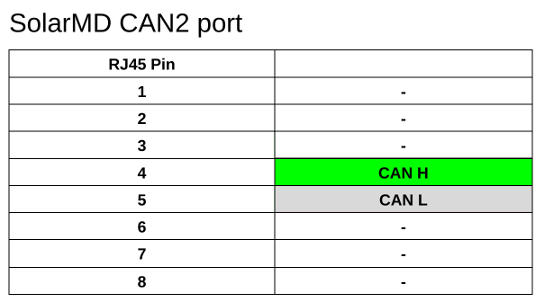
You will need to SolarAssistant CAN bus USB cable or alternatively the Seeed Studio CAN Analyzer. Crimp the cable into an RJ45 plug with the pinout below.
Protocol selection
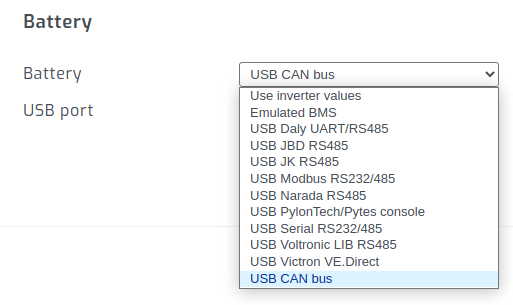
On the SolarAssistant configuration page, select the protocol below.
Result
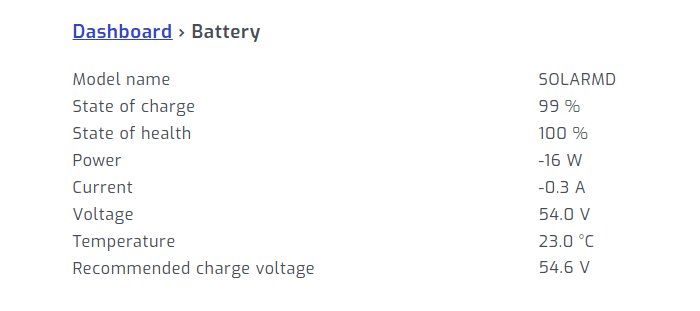
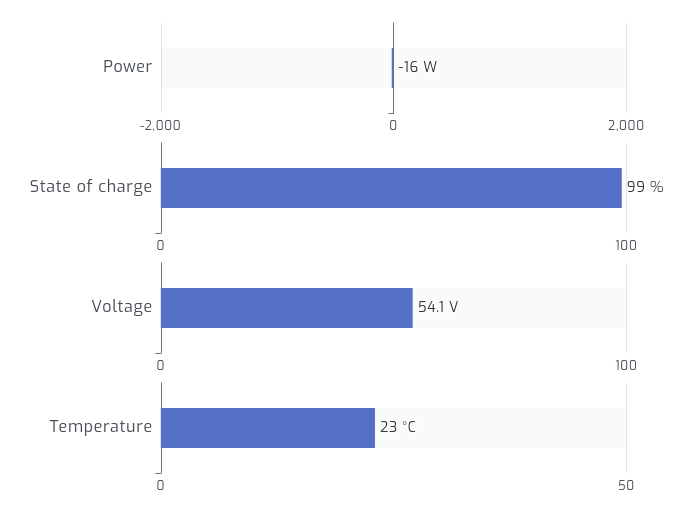
When multiple batteries are connected in parallel they will display as one large battery. Per pack metrics via CAN bus might be available in future.
Troubleshooting
If you find the data from the battery is incorrect, you may need to set the battery to Sunsynk mode. To set to Sunsynk mode, follow these steps: